Python Tuples and Sets Explained – Store Unique and Ordered Data
Published: 12 Oct, 2026 | Author: CCI Admin | Category: Python / Programming
Python provides several built-in collection data types to store and manage multiple values. Two useful collections are tuples and sets. Tuples store ordered values that cannot be changed, while sets store unique values without maintaining a guaranteed order.
In this guide from CCI Computer Education, Pudukkottai, you will learn tuples and sets through simple Python programs and practical examples.
1. What Is a Tuple in Python?
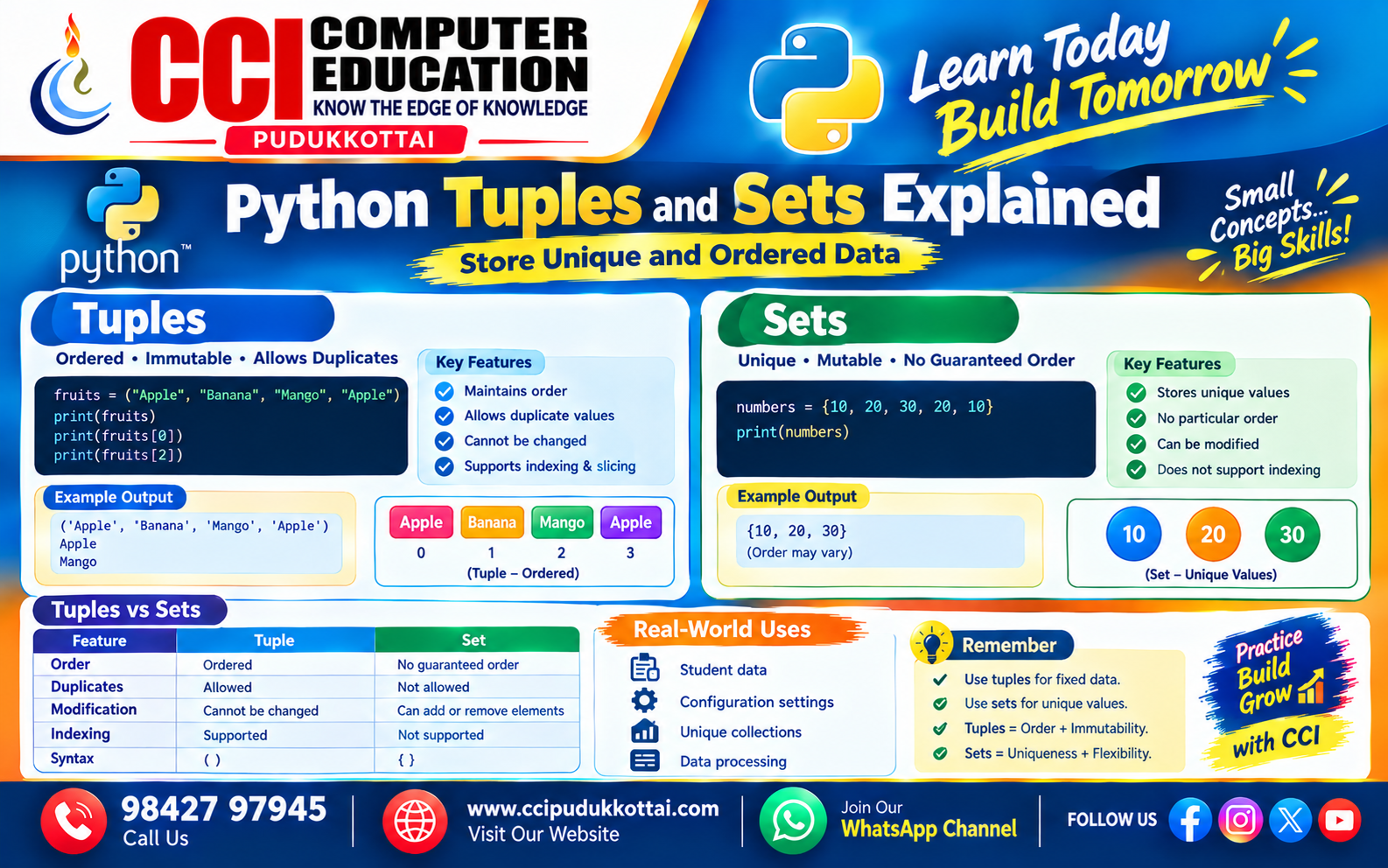
A tuple is an ordered collection of items. It allows duplicate values, but its elements cannot be changed after creation. This property is called immutability.
Example: Creating a Tuple
fruits = ("Apple", "Banana", "Mango", "Apple")

print(fruits)
print(fruits[0])
print(fruits[2])
Output:
('Apple', 'Banana', 'Mango', 'Apple')
Apple
Mango
In this example, the tuple stores four values. The same value, "Apple", appears twice, and indexing starts from zero.
Important Tuple Features
- Tuples maintain the order of their elements.
- Duplicate values are allowed.
- Elements cannot be reassigned or added directly after creation.
- Tuples support indexing and slicing.
- Tuples can contain different data types.
2. Accessing and Using Tuple Values
Example: Tuple Indexing
student = ("Arun", 20, "Python")

print("Name:", student[0])
print("Age:", student[1])
print("Course:", student[2])
Output:
Name: Arun
Age: 20
Course: Python
Example: Single-Element Tuple
number = (10,)
print(type(number))
Output:
<class 'tuple'>
The comma is important. Without it, (10) is simply an integer expression, not a tuple.
Common Tuple Methods
| Method | Purpose | Example |
|---|---|---|
| count() | Counts occurrences of a value | t.count(10) |
| index() | Returns the first matching index | t.index(10) |
3. What Is a Set in Python?
A set is a collection of unique elements. It automatically removes duplicate values. Sets are mutable, meaning you can add or remove elements after creating them.
Example: Creating a Set
numbers = {10, 20, 30, 20, 10}

print(numbers)
Possible Output:
{10, 20, 30}The duplicate values are removed automatically. Remember that sets do not guarantee a particular display order, so your output order may differ.
Important Set Features
- Sets contain unique elements only.
- Sets do not support indexing or slicing.
- You can add and remove elements.
- Set elements must be hashable, so lists and dictionaries cannot be direct set elements.
- Use
set()to create an empty set.
4. Adding and Removing Set Elements
Example: add() and remove()
courses = {"Python", "Java"}

courses.add("SQL")
print(courses)

courses.remove("Java")
print(courses)
Possible Output:
{'Python', 'Java', 'SQL'}
{'Python', 'SQL'}
The order of elements may vary. The remove() method raises a KeyError if the specified value does not exist. Use discard() if you want to avoid that error.
5. Set Operations in Python
Python sets support mathematical operations that are useful when comparing collections of data.
A = {1, 2, 3, 4}
B = {3, 4, 5, 6}

print("Union:", A | B)
print("Intersection:", A & B)
print("Difference:", A - B)
Possible Output:
Union: {1, 2, 3, 4, 5, 6}
Intersection: {3, 4}
Difference: {1, 2}| Operation | Meaning | Operator |
|---|---|---|
| Union | Combines unique elements from both sets | | |
| Intersection | Returns common elements | & |
| Difference | Returns elements in the first set but not the second | - |
6. Difference Between Tuples and Sets
| Feature | Tuple | Set |
|---|---|---|
| Syntax | (10, 20, 30) | {10, 20, 30} |
| Order | Ordered | No guaranteed order |
| Duplicates | Allowed | Not allowed |
| Modification | Elements cannot be changed directly | Elements can be added or removed |
| Indexing | Supported | Not supported |
| Best Use | Fixed collections of values | Unique values and set comparisons |
7. Real-World Example: Managing Student Courses
A training centre can use a tuple to store fixed student details and a set to maintain unique course names.
student = ("Arun", 20, "Pudukkottai")

courses = {"Python", "Java", "Python", "SQL"}

print("Student Name:", student[0])
print("Available Courses:", courses)
Possible Output:
Student Name: Arun
Available Courses: {'Python', 'Java', 'SQL'}
This example demonstrates how tuples and sets can help organize information in student management systems and other Python applications.
8. Common Mistakes to Avoid
- Trying to change a tuple element directly.
- Forgetting the comma when creating a single-element tuple.
- Expecting a set to preserve a particular order.
- Using an index such as
my_set[0]on a set. - Writing
{}when you need an empty set. Useset()instead, because{}creates an empty dictionary.
9. Faculty Tip
At CCI Computer Education, students can understand these collections more easily by running small programs. Ask learners to create a tuple of five student marks, create a set of course names, and experiment with duplicate values and set operations.
10. Practice Task for Students
- Create a tuple containing five favourite foods and print the first and last items.
- Create a set containing repeated numbers and observe the result.
- Add a new course to a set and remove an existing course.
- Create two sets of student names and find their common names using intersection.
11. Frequently Asked Questions (FAQs)
1. What is a tuple in Python?
A tuple is an ordered collection that allows duplicate values and cannot be modified directly after creation.
2. What is a set in Python?
A set is a mutable collection that stores unique, hashable elements without guaranteeing a particular order.
3. Can a tuple contain duplicate values?
Yes. Tuples allow duplicate values, while sets automatically keep only one occurrence of each equal element.
4. Can we change values in a set?
Yes. You can add or remove elements using methods such as add(), remove(), and discard().
5. When should we use tuples and sets?
Use tuples for ordered data that should remain fixed, and sets when you need unique values or want to compare collections.
Conclusion
Python tuples and sets are useful collection data types with different purposes. Tuples preserve order and prevent direct modification of their elements, while sets manage unique values and support powerful mathematical operations. Understanding both will help you write cleaner and more effective Python programs.
Keep practising Python with CCI Computer Education and build your programming skills step by step.
What to Learn Next
- Python Lists – Store and Manage Multiple Values
- Python Dictionaries – Key-Value Data Explained
- Python Functions Explained with Examples
Related CCI Blogs
- Python Variables and Data Types
- Python Conditional Statements – if, elif and else
- Python Lists – Store and Manage Multiple Values
Learn Python with CCI Computer Education
Want to improve your Python programming skills? Join CCI Computer Education, Pudukkottai, and learn programming concepts through practical examples and projects. 👆Click Here
Call: 98427 97945 | Website: www.ccipudukkottai.com
WhatsApp Channel: Follow CCI Computer Education
CCI Computer Education – Learn Today, Build Tomorrow.