Java Inheritance Explained with Real-World Examples
Published: 07 Oct, 2026 | Author: CCI Admin | Category: Java / Programming
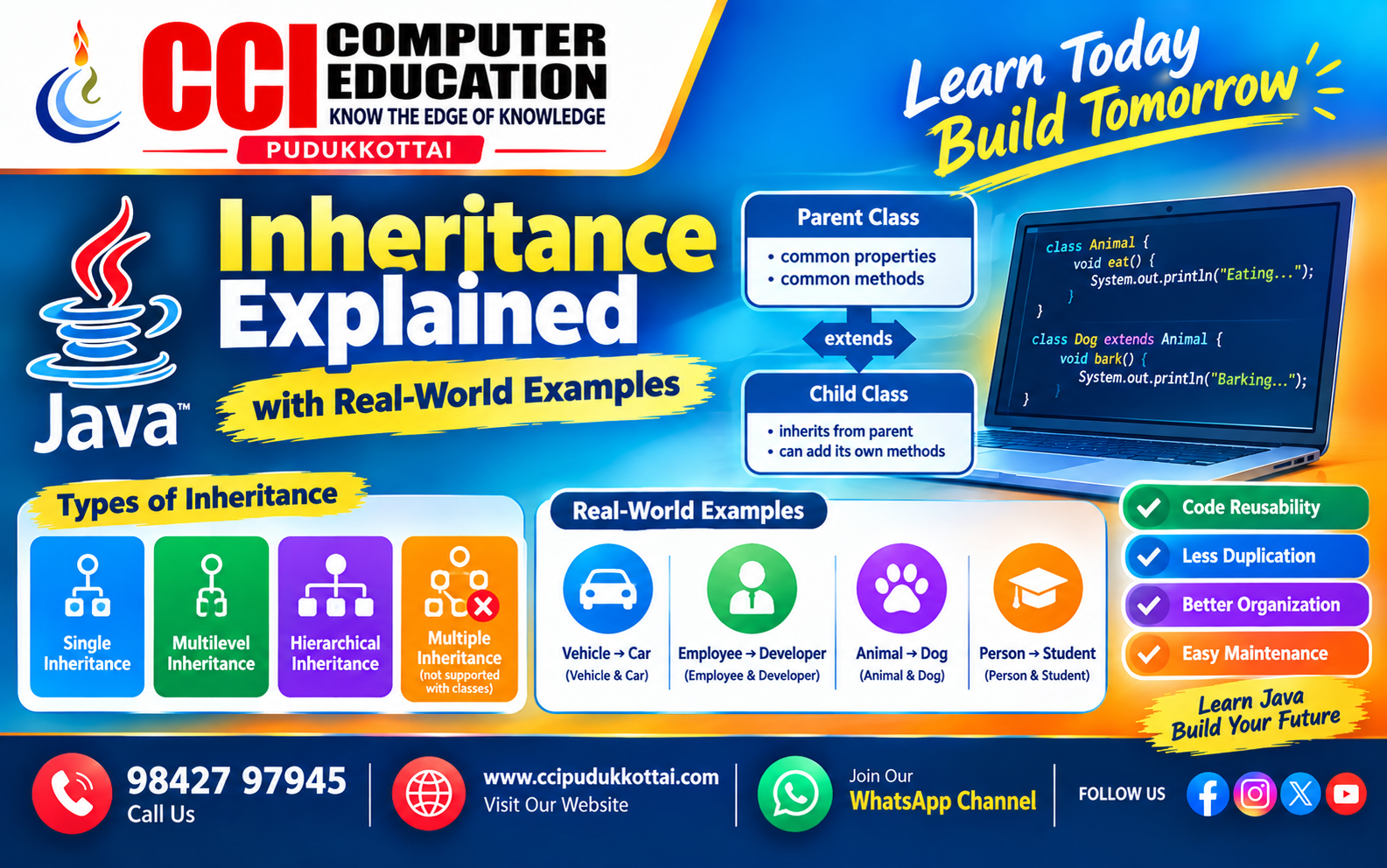
Inheritance is one of the most important concepts in Object-Oriented Programming (OOP). In Java, inheritance allows one class to acquire the properties and methods of another class.
It helps developers reuse existing code, reduce duplication, and create a clear relationship between classes.
What is Inheritance in Java?
Inheritance is a mechanism where a new class gets the properties and methods of an existing class.
The existing class is called the Parent Class or Superclass, while the new class is called the Child Class or Subclass.
Java uses the extends keyword to implement inheritance.
Simple Inheritance Example
class Animal {

    void eat() {
        System.out.println("Animal is eating");
    }
}

class Dog extends Animal {

    void bark() {
        System.out.println("Dog is barking");
    }
}

public class Main {

    public static void main(String[] args) {

        Dog d = new Dog();

        d.eat();
        d.bark();
    }
}
Output
Animal is eating
Dog is barking
Here, the Dog class inherits the eat() method from the Animal class.
How Java Inheritance Works
The basic structure of inheritance can be represented as:
Parent Class
     |
     | extends
     ↓
Child Class
The child class can use accessible properties and methods of the parent class and can also have its own methods and properties.
Real-World Example – Vehicle
Consider a real-world example of vehicles. A general Vehicle can have common features such as starting and stopping.
A Car can inherit these common features and add its own functionality.
class Vehicle {

    void start() {
        System.out.println("Vehicle starts");
    }

    void stop() {
        System.out.println("Vehicle stops");
    }
}

class Car extends Vehicle {

    void drive() {
        System.out.println("Car is driving");
    }
}

public class Main {

    public static void main(String[] args) {

        Car car = new Car();

        car.start();
        car.drive();
        car.stop();
    }
}
Output
Vehicle starts
Car is driving
Vehicle stops
This is useful because the common functionality is written only once in the Vehicle class.
Types of Inheritance in Java
Java commonly uses the following inheritance structures:
| Type | Description | Example |
|---|---|---|
| Single | One child class inherits from one parent class. | Animal → Dog |
| Multilevel | A class inherits from another child class. | Animal → Dog → Puppy |
| Hierarchical | Multiple child classes inherit from the same parent class. | Animal → Dog, Cat |
| Multiple | One class inherits from multiple classes. | Not supported directly with Java classes |
1. Single Inheritance
In single inheritance, one child class inherits from one parent class.
class Employee {

    void work() {
        System.out.println("Employee is working");
    }
}

class Developer extends Employee {

    void code() {
        System.out.println("Developer is coding");
    }
}
Here, Developer inherits the work() method from Employee.
2. Multilevel Inheritance
In multilevel inheritance, inheritance occurs across multiple levels.
class Animal {

    void eat() {
        System.out.println("Animal eats");
    }
}

class Dog extends Animal {

    void bark() {
        System.out.println("Dog barks");
    }
}

class Puppy extends Dog {

    void play() {
        System.out.println("Puppy plays");
    }
}
The Puppy class can access accessible methods from both Dog and Animal.
3. Hierarchical Inheritance
In hierarchical inheritance, multiple child classes inherit from the same parent class.
class Animal {

    void eat() {
        System.out.println("Animal eats");
    }
}

class Dog extends Animal {

    void bark() {
        System.out.println("Dog barks");
    }
}

class Cat extends Animal {

    void meow() {
        System.out.println("Cat meows");
    }
}
Both Dog and Cat can use the common eat() method from Animal.
Why is Inheritance Useful?
- Promotes code reusability.
- Reduces duplicate code.
- Makes programs easier to maintain.
- Creates relationships between classes.
- Supports method overriding and polymorphism.
- Helps organize large applications.
Inheritance and Method Overriding
A child class can provide its own implementation of a method that already exists in the parent class. This is called Method Overriding.
class Animal {

    void sound() {
        System.out.println("Animal makes a sound");
    }
}

class Dog extends Animal {

    @Override
    void sound() {
        System.out.println("Dog barks");
    }
}

public class Main {

    public static void main(String[] args) {

        Dog d = new Dog();

        d.sound();
    }
}
Output
Dog barks
The child class Dog provides its own version of the sound() method.
Real-World Example – Employee Management System
In a company application, different employees may share common information such as name and salary while having their own specific responsibilities.
class Employee {

    String name;

    void showName() {
        System.out.println("Employee: " + name);
    }
}

class Developer extends Employee {

    void writeCode() {
        System.out.println("Developer writes code");
    }
}

class Manager extends Employee {

    void manageTeam() {
        System.out.println("Manager manages the team");
    }
}
Here, Developer and Manager reuse the common functionality of the Employee class.
Inheritance vs Normal Code Reuse
| Feature | Inheritance | Duplicate Code |
|---|---|---|
| Code Reuse | High | Low |
| Maintenance | Easier | Difficult |
| Relationship | Parent-Child relationship | No class relationship |
| Code Duplication | Reduced | Increased |
Common Mistakes in Java Inheritance
- Forgetting the extends keyword.
- Trying to access private members directly from a child class.
- Confusing inheritance with method overriding.
- Creating unnecessary inheritance relationships.
- Assuming Java supports multiple inheritance through classes.
Faculty Tip
For beginners, understand inheritance using a simple relationship:
Animal
  |
  ├── Dog
  |
  └── Cat
First understand the Parent → Child relationship. Then practice method overriding and different inheritance structures.
Practice Task for Students
Create a Java program using inheritance for a simple College Management System.
- Create a parent class called Person.
- Add name and age properties.
- Create a child class called Student.
- Add course information to Student.
- Create another child class called Teacher.
- Add subject information to Teacher.
- Display the inherited and child-specific information.
Frequently Asked Questions
1. What is inheritance in Java?
Inheritance is an OOP feature that allows a child class to acquire accessible properties and methods from a parent class.
2. Which keyword is used for inheritance in Java?
The extends keyword is used when one Java class inherits from another class.
3. Does Java support multiple inheritance?
Java does not support multiple inheritance through classes. However, Java can achieve multiple-type inheritance using interfaces.
4. What is a parent class?
A parent class, also called a superclass, is the class whose accessible members are inherited by another class.
5. What is a child class?
A child class, also called a subclass, is a class that inherits from another class.
6. Why is inheritance important?
Inheritance improves code reuse, reduces duplication, and helps create organized object-oriented applications.
Conclusion
Java Inheritance is an important OOP concept that helps developers reuse existing code and build relationships between classes. By using inheritance, applications can become more organized, reusable, and easier to maintain.
Beginners should practice simple examples such as Animal → Dog, Vehicle → Car, and Employee → Developer before moving to advanced OOP concepts.
What to Learn Next?
After learning inheritance, students can continue with:
- Method Overriding
- Polymorphism in Java
- Encapsulation
- Abstraction
- Interfaces in Java
- Exception Handling
Related CCI Blogs
- Introduction to Java Programming
- Java Variables and Data Types
- Java Classes and Objects
- Java Constructors Explained with Simple Examples
- Java Methods – Create Reusable Code with Simple Examples
Learn More About Java Programming
Want to learn Java programming from the basics and build practical applications? CCI Computer Education helps students develop programming skills through concepts, coding practice, and real-world projects.
Start learning Java and build your programming skills with CCI.
👆Click hereContact CCI Computer Education – Pudukkottai
Want to learn Java programming and Object-Oriented Programming?
Call: 98427 97945 | Website: ccipudukkottai.com
WhatsApp Channel: Join CCI WhatsApp Channel
CCI Computer Education – Learn Today, Build Tomorrow.