JavaScript Arrays Explained with Practical Examples
Published: 01 Oct, 2026 | Author: CCI Admin | Category: JavaScript / Web Development
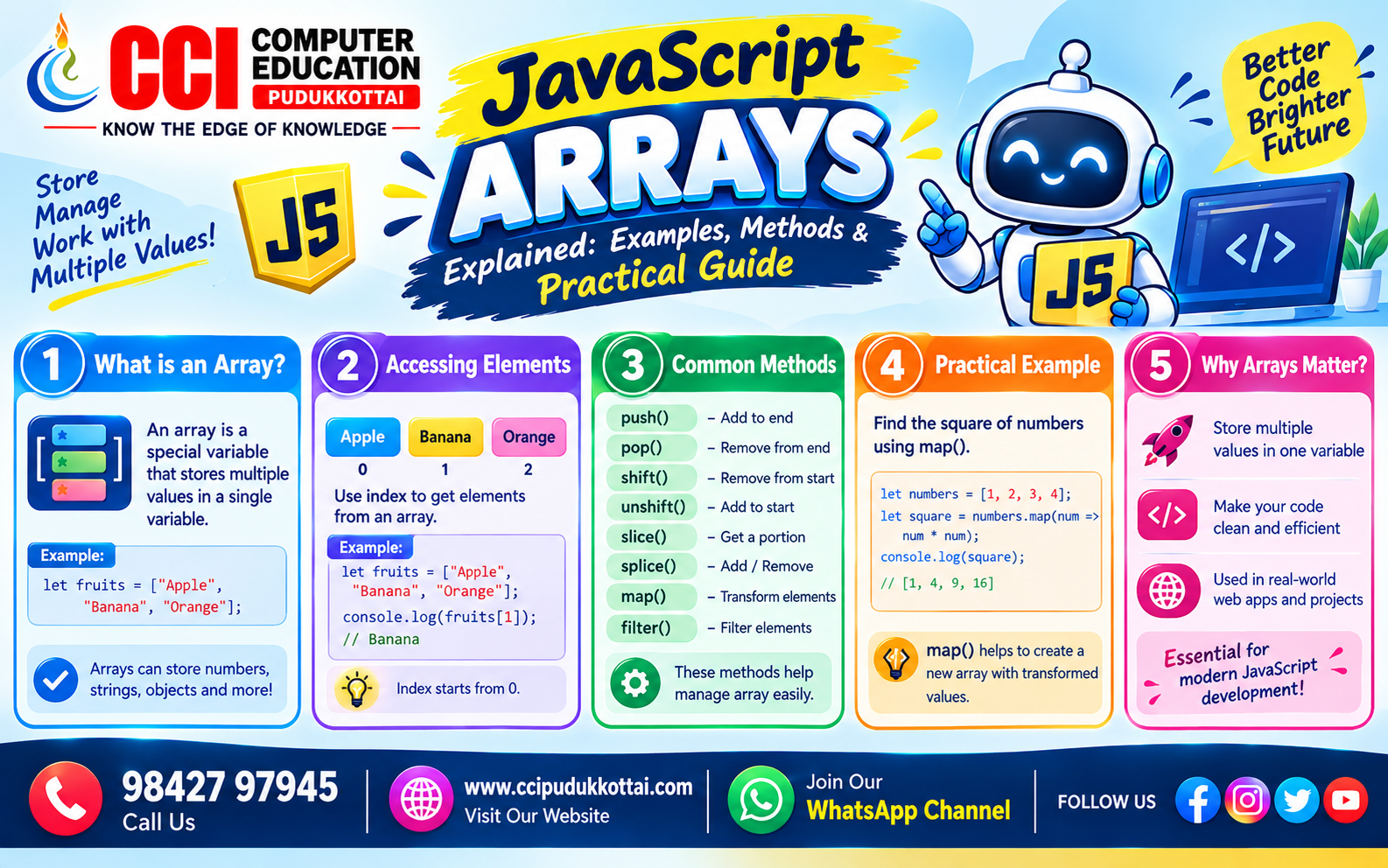
JavaScript arrays are used to store multiple values in a single variable. Arrays are one of the most commonly used data structures in JavaScript and are essential for handling lists of names, numbers, products, marks, and other collections of data.
In this blog, CCI Computer Education explains JavaScript arrays with simple and practical examples suitable for beginners and students who are learning web development.
What is a JavaScript Array?
An array is a collection of multiple values stored in a single variable. Each value in an array is called an element. JavaScript arrays use index numbers to identify elements.
The first element always starts with index 0.
let fruits = ["Apple", "Banana", "Mango"];

console.log(fruits);
Output:
["Apple", "Banana", "Mango"]
Why Use Arrays in JavaScript?
Imagine a student has five marks. Instead of creating five separate variables, we can store all the marks inside one array.
let mark1 = 80;
let mark2 = 75;
let mark3 = 90;
let mark4 = 85;
let mark5 = 95;
Using an array makes the program simpler:
let marks = [80, 75, 90, 85, 95];
This makes it easier to process, search, update, and display multiple values.
How to Create a JavaScript Array
There are several ways to create arrays. The most common method is using square brackets [].
let students = ["Arun", "Priya", "Kumar", "Divya"];

console.log(students);
We can also create an empty array and add values later.
let courses = [];

courses.push("Python");
courses.push("Java");
courses.push("JavaScript");

console.log(courses);
Accessing Array Elements
Array elements are accessed using their index number. Remember that JavaScript array indexing starts from 0.
let fruits = ["Apple", "Banana", "Mango"];

console.log(fruits[0]);
console.log(fruits[1]);
console.log(fruits[2]);
Output:
Apple
Banana
Mango
Understanding Array Indexing
| Index | Value |
|---|---|
| 0 | Apple |
| 1 | Banana |
| 2 | Mango |
Changing an Array Element
We can change an existing array value by assigning a new value to its index.
let fruits = ["Apple", "Banana", "Mango"];

fruits[1] = "Orange";

console.log(fruits);
Output:
["Apple", "Orange", "Mango"]
Finding the Array Length
The length property tells us how many elements are present in an array.
let students = ["Arun", "Priya", "Kumar", "Divya"];

console.log(students.length);
Output:
4
Adding Elements Using push()
The push() method adds one or more elements to the end of an array.
let fruits = ["Apple", "Banana"];

fruits.push("Mango");

console.log(fruits);
Output:
["Apple", "Banana", "Mango"]
Removing Elements Using pop()
The pop() method removes the last element from an array.
let fruits = ["Apple", "Banana", "Mango"];

fruits.pop();

console.log(fruits);
Output:
["Apple", "Banana"]
Adding Elements Using unshift()
The unshift() method adds an element to the beginning of an array.
let students = ["Priya", "Kumar"];

students.unshift("Arun");

console.log(students);
Output:
["Arun", "Priya", "Kumar"]
Removing Elements Using shift()
The shift() method removes the first element from an array.
let students = ["Arun", "Priya", "Kumar"];

students.shift();

console.log(students);
Output:
["Priya", "Kumar"]
Looping Through an Array
Arrays are often used with loops to process each element one by one.
Using a for Loop
let fruits = ["Apple", "Banana", "Mango"];

for (let i = 0; i < fruits.length; i++) {
    console.log(fruits[i]);
}
Output:
Apple
Banana
Mango
Using forEach()
The forEach() method provides a simple way to execute code for every array element.
let fruits = ["Apple", "Banana", "Mango"];

fruits.forEach(function(fruit) {
    console.log(fruit);
});
Practical Example – Student Marks
Arrays are very useful in student management and education applications. For example, we can store student marks in an array and calculate the total.
let marks = [80, 75, 90, 85, 95];

let total = 0;

for (let i = 0; i < marks.length; i++) {
    total = total + marks[i];
}

console.log("Total Marks:", total);
Output:
Total Marks: 425
Practical Example – Product List
Arrays can also be used in e-commerce websites to store product names.
let products = [
    "Laptop",
    "Mobile Phone",
    "Keyboard",
    "Mouse"
];

products.forEach(function(product) {
    console.log(product);
});
Common JavaScript Array Methods
| Method / Property | Purpose |
|---|---|
| length | Finds the number of elements |
| push() | Adds elements at the end |
| pop() | Removes the last element |
| shift() | Removes the first element |
| unshift() | Adds elements at the beginning |
| forEach() | Processes each array element |
Array of Different Data Types
JavaScript arrays can contain different types of values.
let student = [
    "Arun",
    21,
    true,
    "Python"
];

console.log(student);
Although JavaScript allows mixed data types, using consistent data types where appropriate can make programs easier to understand and maintain.
Common Mistakes with JavaScript Arrays
- Remember that array indexing starts from 0.
- Do not access an index that does not exist without checking the data.
- Use length when looping through an array.
- Understand the difference between push() and unshift().
- Understand the difference between pop() and shift().
Faculty Tip
For beginners, start with a simple array such as student names or marks. Ask students to create the array, access individual elements, change a value, add a new value, remove a value, and finally display all elements using a loop.
Practice Task for Students
Create a JavaScript array containing five programming languages. Then complete the following tasks:
- Display the first language.
- Display the last language.
- Add one new language using push().
- Remove the last language using pop().
- Display all languages using forEach().
Frequently Asked Questions
1. What is an array in JavaScript?
A JavaScript array is a data structure used to store multiple values in a single variable.
2. Does JavaScript array indexing start from 0?
Yes. The first element of a JavaScript array has index 0.
3. How do I find the number of elements in an array?
Use the length property.
let numbers = [10, 20, 30];

console.log(numbers.length);
4. Which method adds an element to the end?
The push() method adds an element to the end of an array.
5. Which method removes the last element?
The pop() method removes the last element from an array.
Why Learn JavaScript Arrays?
Arrays are an important foundation for JavaScript programming. They are widely used when working with student records, products, shopping carts, user data, search results, menus, and many other web application features.
Once you understand arrays, you can move on to more advanced concepts such as map(), filter(), reduce(), searching, sorting, and working with arrays of objects.
Conclusion
JavaScript arrays provide a convenient way to store and manage multiple values in a single variable. By learning array indexing, length, push(), pop(), shift(), unshift(), and loops, beginners can build a strong foundation for JavaScript programming.
Related CCI Blogs
- How a Website Works – From Browser to Server Explained
- CSS Selectors Explained for Beginners – How to Select and Style HTML Elements
- HTML Semantic Elements – Build Meaningful and SEO-Friendly Web Pages
Call: 98427 97945 | Website: ccipudukkottai.com | WhatsApp Channel: Join Now
Share: Facebook | WhatsApp | Twitter