Primary Key and Foreign Key Explained with Simple Examples
Published: 29 Sep, 2026 | Author: CCI Admin | Category: Database / MySQL
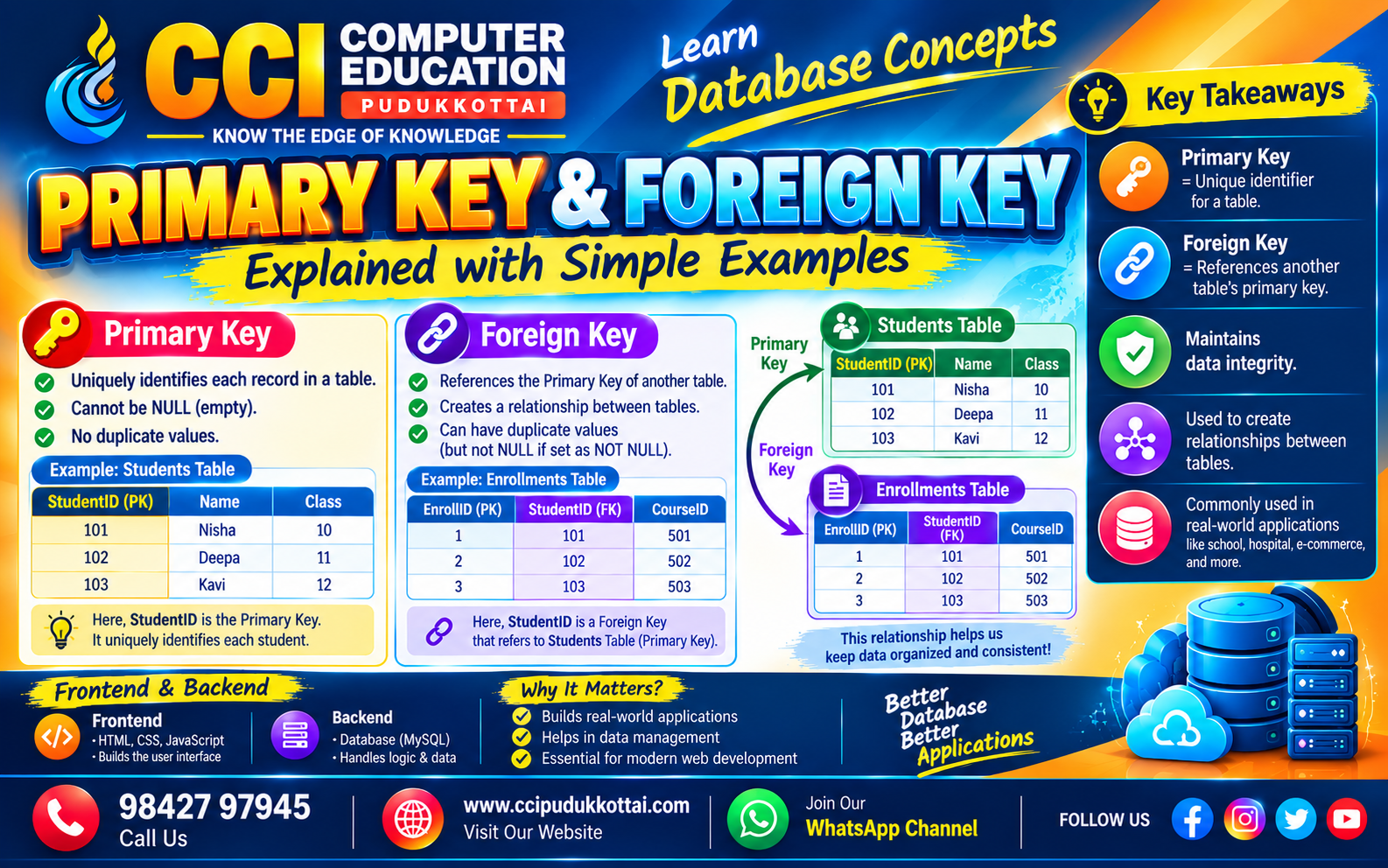
Primary Key and Foreign Key are two important concepts in relational databases. They help organize data, identify records, and create relationships between different tables.
In this blog, we will understand Primary Key and Foreign Key with simple SQL examples and a real-world student database example.
What is a Primary Key?
A Primary Key is a column or combination of columns that uniquely identifies each record in a database table.
A Primary Key must contain unique values and cannot contain NULL values.
Simple Primary Key Example
CREATE TABLE Students (
    student_id INT PRIMARY KEY,
    name VARCHAR(100),
    course VARCHAR(100)
);
Here, student_id is the Primary Key. Each student should have a unique student ID.
Example Student Table
| Student ID | Name | Course |
|---|---|---|
| 101 | Arun | Java |
| 102 | Priya | Python |
| 103 | Kumar | SQL |
Here, 101, 102, and 103 are unique student IDs.
What is a Foreign Key?
A Foreign Key is a column used to create a relationship between two tables. It usually refers to the Primary Key of another table.
For example, a student's attendance information can be stored in a separate table. The student_id can be used as a Foreign Key to connect the two tables.
Simple Foreign Key Example
CREATE TABLE Attendance (
    attendance_id INT PRIMARY KEY,
    student_id INT,
    attendance_date DATE,
    status VARCHAR(20),

    FOREIGN KEY (student_id)
    REFERENCES Students(student_id)
);
Here, attendance_id is the Primary Key of the Attendance table, while student_id is the Foreign Key.
How Primary Key and Foreign Key Work Together
Students Table
----------------
student_id (PK)
name
course
       |
       |
       ↓
Attendance Table
----------------
attendance_id (PK)
student_id (FK)
attendance_date
status
The Foreign Key connects the Attendance table with the Students table using the student ID.
Real Problem: Why Do We Need Foreign Keys?
Imagine a college system where student information and attendance information are stored in separate tables.
If we store the student's complete name, course, and other details repeatedly in the Attendance table, the same information may appear many times.
Instead, we can store only the student's ID in the Attendance table. The Foreign Key then connects the attendance record to the correct student.
Creating Related Tables
CREATE TABLE Courses (
    course_id INT PRIMARY KEY,
    course_name VARCHAR(100)
);

CREATE TABLE Students (
    student_id INT PRIMARY KEY,
    student_name VARCHAR(100),
    course_id INT,

    FOREIGN KEY (course_id)
    REFERENCES Courses(course_id)
);
In this example, course_id is the Primary Key in the Courses table and a Foreign Key in the Students table.
Inserting Data
INSERT INTO Courses
VALUES (1, 'Java');

INSERT INTO Courses
VALUES (2, 'Python');

INSERT INTO Students
VALUES (101, 'Arun', 1);

INSERT INTO Students
VALUES (102, 'Priya', 2);
Now each student is connected to a course using course_id.
Viewing Related Data Using JOIN
SQL JOIN can be used to retrieve related information from multiple tables.
SELECT
    Students.student_id,
    Students.student_name,
    Courses.course_name
FROM Students
JOIN Courses
ON Students.course_id = Courses.course_id;
This query combines student information with the corresponding course information.
Practical Workflow
When designing a database, you can follow these simple steps:
- Create the main table.
- Select a column that uniquely identifies each record.
- Make that column the Primary Key.
- Create the related table.
- Add a Foreign Key to connect the tables.
- Insert related data.
- Use JOIN queries to retrieve combined information.
Real-World Examples
- Student Management: Student ID connects students and attendance.
- Employee Management: Department ID connects employees and departments.
- Banking: Customer ID connects customers and accounts.
- E-Commerce: Customer ID connects customers and orders.
- College Management: Course ID connects students and courses.
Primary Key vs Foreign Key
| Primary Key | Foreign Key |
|---|---|
| Uniquely identifies a record | Connects two tables |
| Values are unique | Values can repeat |
| Cannot contain NULL | Can contain NULL depending on design |
| Identifies records | References another table |
Common Mistakes
- Using duplicate values for a Primary Key.
- Trying to insert NULL into a Primary Key.
- Using an incorrect Foreign Key reference.
- Confusing a Foreign Key with a Primary Key.
- Deleting related records without understanding the relationship.
- Creating unnecessary duplicate data instead of using relationships.
Faculty Tip
A simple way to remember the difference is:
Primary Key = Identifies the record.
Foreign Key = Connects the tables.
Ask students to draw two tables on paper and connect the Primary Key of one table to the Foreign Key of another table. This makes the concept easier to understand.
Practice Task
Create two tables named Employees and Departments.
- Create department_id as the Primary Key in Departments.
- Create employee_id as the Primary Key in Employees.
- Use department_id as a Foreign Key in Employees.
- Insert at least three departments.
- Insert at least five employees.
- Use JOIN to display employee names with department names.
Frequently Asked Questions
1. What is a Primary Key?
A Primary Key uniquely identifies each record in a database table.
2. What is a Foreign Key?
A Foreign Key is used to create a relationship between two tables by referencing a key in another table.
3. Can a Foreign Key contain duplicate values?
Yes. A Foreign Key can generally contain duplicate values because multiple records can refer to the same record in another table.
4. Can a table have both Primary Key and Foreign Key?
Yes. A table can have its own Primary Key and also contain one or more Foreign Keys that reference other tables.
5. Why are Primary Keys and Foreign Keys important?
They help identify records, connect related tables, and maintain relationships between data in relational databases.
Learn Database and MySQL at CCI
At CCI Computer Education, Pudukkottai, students can learn SQL, MySQL, database design, table relationships, JOIN queries, and practical database concepts through hands-on examples and projects.
Conclusion
Primary Keys and Foreign Keys are fundamental concepts in relational database design. A Primary Key identifies a record uniquely, while a Foreign Key helps connect related tables.
Understanding these concepts is essential for building applications such as Student Management Systems, Employee Management Systems, Banking Systems, and E-Commerce applications.
What's Next?
In the next database tutorial, we will explore SQL JOINs and learn how to retrieve related data from multiple tables.
Related CCI Blogs
- Basic SQL Queries – Learn SQL with Simple Examples
- Introduction to MySQL – Learn Database Basics from Scratch
- SQL SELECT, WHERE and ORDER BY Commands – Learn SQL Basics with Examples
Contact CCI Computer Education – Pudukkottai
Want to improve your SQL and Database skills? Join CCI Computer Education, Pudukkottai and learn through practical, step-by-step training.
Call: 98427 97945 | Website: ccipudukkottai.com | WhatsApp Channel: Join Now
Share: Facebook | WhatsApp | Twitter