How a Website Works – From Browser to Server Explained
Published: 28 Sep, 2026 | Author: CCI Admin | Category: Web Development
Have you ever wondered what happens when you type a website address into your browser and press Enter? A website may look simple on the screen, but several steps happen behind the scenes before the webpage appears.
In this blog, we will understand how a website works from the browser to the web server using simple examples.
1. What Happens When You Enter a Website Address?
When you type a website address such as www.ccipudukkottai.com into a browser, the browser needs to find the correct server and request the required webpage.
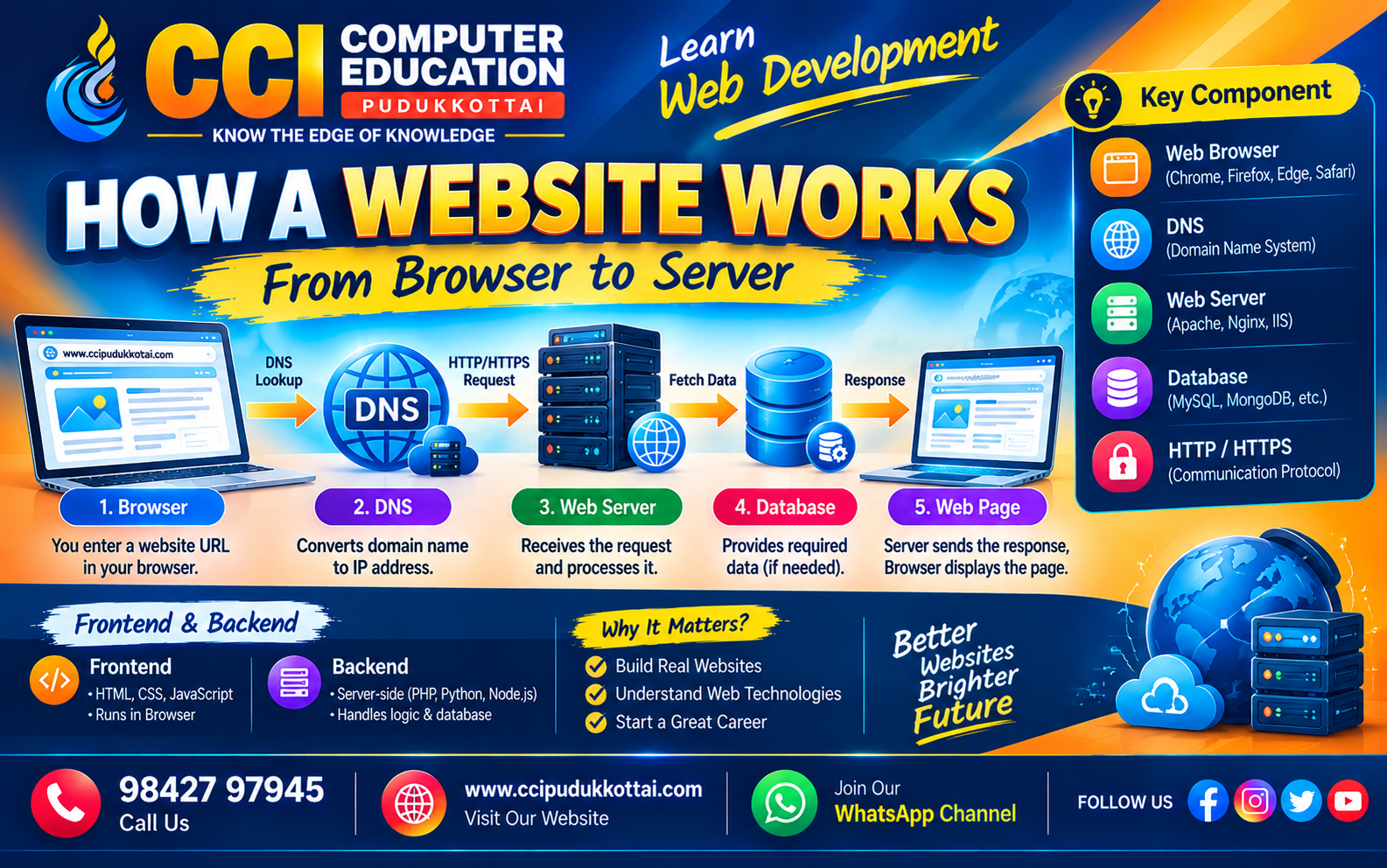
The basic process can be understood as:
Browser
   ↓
DNS
   ↓
Web Server
   ↓
Database
   ↓
Server Response
   ↓
Browser
   ↓
Web Page
2. What is a Web Browser?
A web browser is software used to access websites on the internet. Popular browsers include Chrome, Firefox, Edge, and Safari.
The browser sends requests to web servers and displays the response as a webpage.
3. What is DNS?
DNS stands for Domain Name System. It helps convert a human-readable domain name into the IP address of the server hosting the website.
For example:
www.example.com
       ↓
DNS
       ↓
IP Address of the Server
This allows the browser to locate the correct server.
4. What is a Web Server?
A web server is a computer or software system that stores and delivers website resources such as HTML, CSS, JavaScript, images, and other files.
When the browser sends a request, the web server processes the request and sends an appropriate response.
5. What is an HTTP Request?
HTTP stands for HyperText Transfer Protocol. It is used for communication between a browser and a web server.
For example, when you open a webpage, the browser can send an HTTP request to the server asking for the webpage.
Browser
   ↓
HTTP Request
   ↓
Web Server
6. What is an HTTP Response?
After processing the request, the server sends an HTTP response back to the browser.
The response may contain HTML, CSS, JavaScript, images, or other data required to display the webpage.
Web Server
   ↓
HTTP Response
   ↓
Browser
7. Where Does the Database Come In?
Many modern websites need to store and retrieve information from a database.
For example, an online student management system may store:
- Student names
- Student IDs
- Course details
- Attendance records
- Login information
When a user requests information, the server can communicate with the database and return the required data.
8. Simple Website Workflow
Let's understand the complete process with a simple example.
1. User enters website URL
          ↓
2. Browser contacts DNS
          ↓
3. DNS finds the server IP address
          ↓
4. Browser sends request to server
          ↓
5. Server processes the request
          ↓
6. Server may access a database
          ↓
7. Server sends response
          ↓
8. Browser displays the webpage
9. Frontend and Backend
A website generally has two important sides: the frontend and the backend.
| Frontend | Backend |
|---|---|
| Runs mainly in the browser | Runs on the server |
| HTML, CSS and JavaScript | Server-side programming and databases |
| Creates the user interface | Processes requests and business logic |
| User interacts with the page | Communicates with databases and services |
10. Real-World Example
Consider an online shopping website.
When a customer searches for a product, the browser sends a request to the server. The server processes the request, retrieves the required product information from the database, and sends the results back to the browser.
Customer
   ↓
Browser
   ↓
Web Server
   ↓
Product Database
   ↓
Web Server
   ↓
Browser
   ↓
Product Results
11. HTTPS and Website Security
Modern websites commonly use HTTPS to provide encrypted communication between the browser and server.
You can usually see a lock symbol near the website address when a website is using HTTPS.
12. Common Mistakes Beginners Make
- Thinking a website is only HTML.
- Not understanding the difference between frontend and backend.
- Ignoring how DNS works.
- Confusing a domain name with a server.
- Not understanding request and response communication.
Faculty Tip
A simple way to remember the workflow is: Browser → DNS → Server → Database → Response → Browser.
Understanding this flow will make it easier for students to learn frontend development, backend development, APIs, databases, and full-stack development.
Practice Task
Open any website in your browser and try to identify the following:
- Domain name
- Frontend technologies
- Whether HTTPS is used
- Possible backend functionality
- Possible database usage
Frequently Asked Questions
1. What happens when we enter a website URL?
The browser uses DNS to locate the server, sends a request, receives a response, and displays the webpage.
2. What is DNS?
DNS converts domain names into IP addresses so browsers can locate the appropriate server.
3. What is a web server?
A web server handles requests and delivers website resources or generated responses to clients.
4. What is the difference between frontend and backend?
Frontend focuses mainly on the user interface, while backend handles server-side processing, business logic, data access, and related services.
5. Why is HTTPS important?
HTTPS helps protect data exchanged between a browser and server by encrypting the connection.
Learn Web Development at CCI
At CCI Computer Education, Pudukkottai, students can learn HTML, CSS, JavaScript, frontend development, backend development, databases, and full-stack development through practical examples and projects.
Conclusion
A website involves several components working together. The browser sends a request, DNS helps locate the server, the server processes the request, and the response is returned to the browser.
Understanding this basic workflow gives beginners a strong foundation for learning modern web development and full-stack application development.
What's Next?
Continue your web development journey by learning HTTP Methods and REST APIs and understand how frontend applications communicate with backend services.
Related CCI Blogs
- CSS Selectors Explained for Beginners – How to Select and Style HTML Elements
- Responsive Web Design Basics – Create Websites That Work on Every Device
- HTML Forms and Input Elements
Contact CCI Computer Education – Pudukkottai
Want to learn Web Development and Full Stack Development through practical training?
Call: 98427 97945 | Website: ccipudukkottai.com | WhatsApp Channel: Join Now