HTML Semantic Elements – Build Meaningful and SEO-Friendly Web Pages
Published: 17 Sep 2026 | Author: CCI Admin | Category: HTML / Web Development
When building a website, writing HTML is not only about displaying content on the screen. A well-designed web page should also have a clear structure that browsers, search engines, and users can understand.
This is where HTML Semantic Elements become important. Semantic elements describe the meaning and purpose of the content inside a web page.
At CCI Computer Education, Pudukkottai, students learning web development can use semantic HTML to build cleaner and more professional websites.
What Are Semantic Elements in HTML?
Semantic HTML elements clearly describe what their content represents. Instead of using only generic containers such as <div>, semantic elements give meaning to different parts of a webpage.
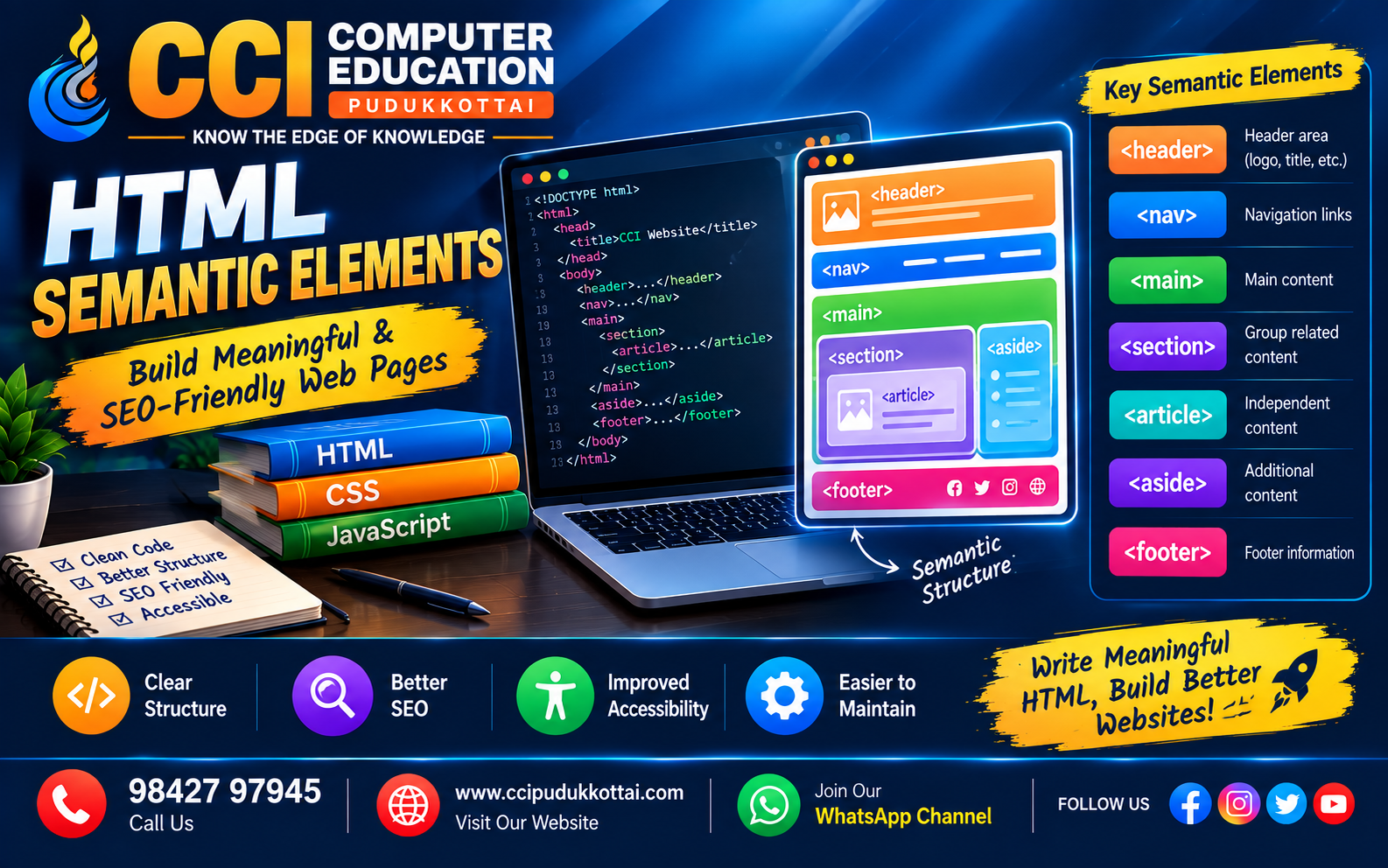
Common semantic elements include:
- <header> – Defines the header area.
- <nav> – Contains navigation links.
- <main> – Contains the main page content.
- <section> – Groups related content.
- <article> – Represents independent content.
- <aside> – Contains related or additional content.
- <footer> – Defines the footer area.
Why Use Semantic HTML?
Semantic elements make the structure of a website easier to understand. They are useful for developers, search engines, and accessibility tools.
- Creates a clear webpage structure.
- Makes HTML code easier to read.
- Helps search engines understand page content.
- Improves accessibility.
- Makes websites easier to maintain.
- Provides better organization for large web pages.
Important Semantic Elements
1. <header>
The <header> element represents introductory content for a webpage or a section.
<header>
    <h1>CCI Computer Education</h1>
    <p>Learn Computer Skills</p>
</header>
2. <nav>
The <nav> element is used for important navigation links.
<nav>
    <a href="#">Home</a>
    <a href="#">Courses</a>
    <a href="#">Contact</a>
</nav>
3. <main>
The <main> element contains the primary content of the webpage.
<main>
    <h2>Java Programming Course</h2>
    <p>Learn Java from basics to advanced concepts.</p>
</main>
4. <section>
The <section> element groups related content into a meaningful section.
<section>
    <h2>Our Courses</h2>
    <p>Java, Python, Web Development and more.</p>
</section>
5. <article>
The <article> element represents independent content such as a blog post, news article, or tutorial.
<article>
    <h2>Learn Python</h2>
    <p>Python is a beginner-friendly programming language.</p>
</article>
6. <aside>
The <aside> element contains additional information related to the main content.
<aside>
    <h3>Related Courses</h3>
    <ul>
        <li>Java Programming</li>
        <li>Python Programming</li>
    </ul>
</aside>
7. <footer>
The <footer> element represents the bottom section of a webpage.
<footer>
    <p>CCI Computer Education - Pudukkottai</p>
    <p>Call: 98427 97945</p>
</footer>
Complete Semantic HTML Example
<!DOCTYPE html>
<html>

<head>
    <title>CCI Computer Education</title>
</head>

<body>

    <header>
        <h1>CCI Computer Education</h1>
        <p>Learn. Practice. Build.</p>
    </header>

    <nav>
        <a href="#">Home</a>
        <a href="#">Courses</a>
        <a href="#">Blog</a>
        <a href="#">Contact</a>
    </nav>

    <main>

        <section>
            <h2>Web Development</h2>
            <p>
                Learn HTML, CSS and JavaScript to build modern websites.
            </p>
        </section>

        <article>
            <h2>HTML Semantic Elements</h2>
            <p>
                Semantic elements provide meaning and structure to web pages.
            </p>
        </article>

        <aside>
            <h3>Related Topics</h3>
            <p>HTML Forms</p>
            <p>CSS Basics</p>
        </aside>

    </main>

    <footer>
        <p>CCI Computer Education, Pudukkottai</p>
    </footer>

</body>

</html>
Semantic Elements vs <div>
| Semantic Element | Purpose |
|---|---|
| <header> | Header or introductory content |
| <nav> | Navigation links |
| <main> | Main page content |
| <section> | Related content group |
| <article> | Independent content |
| <aside> | Additional content |
| <footer> | Footer information |
Real-World Example
Imagine you are creating a website for CCI Computer Education, Pudukkottai. A good semantic structure could be:
- Header – CCI logo and website title
- Navigation – Home, Courses, About and Contact
- Main – Course information
- Section – Java, Python and Web Development courses
- Article – Individual course or blog information
- Aside – Related courses or announcements
- Footer – Contact information and copyright
Common Mistakes
- Using only <div> elements for the entire webpage.
- Using semantic tags without understanding their purpose.
- Adding multiple unnecessary <main> elements.
- Using headings in the wrong order.
- Creating navigation without the <nav> element.
Faculty Tip
CCI Faculty Tip: When teaching HTML, first ask students to draw the structure of a webpage on paper. Then convert each part into the appropriate semantic element. This makes semantic HTML much easier to understand.
Practice Task
Create a simple webpage for a computer training centre using the following semantic elements:
- <header>
- <nav>
- <main>
- <section>
- <article>
- <aside>
- <footer>
Add at least three courses such as Java, Python and Web Development.
Frequently Asked Questions
1. What is semantic HTML?
Semantic HTML uses elements that clearly describe the meaning and purpose of their content.
2. What is the use of the <header> element?
The <header> element is used for introductory content such as a website title, logo or heading.
3. Why is the <nav> element used?
The <nav> element is used to group important navigation links.
4. Is <section> different from <article>?
Yes. A section groups related content, while an article represents independent content that can generally stand on its own.
5. Does semantic HTML help SEO?
Semantic structure can help search engines better understand the organization and meaning of webpage content. It is one part of creating well-structured web pages.
Learn Web Development at CCI
At CCI Computer Education, Pudukkottai, students can learn web development step by step, starting with HTML and CSS and progressing toward JavaScript and full-stack development.
Practical exercises and small projects help students understand how concepts such as semantic HTML are used in real websites.
Conclusion
HTML semantic elements are an important part of modern web development. Elements such as header, nav, main, section, article, aside and footer provide a clear structure and meaning to webpages.
Instead of creating websites using only generic containers, beginners should practice using the correct semantic element for each part of a webpage.
Start with a simple webpage today and practice building a meaningful structure using semantic HTML.
Next Learning Path
After learning semantic HTML, the next step is to learn CSS Layout and Responsive Web Design. You can then combine HTML, CSS and JavaScript to build interactive websites.
Related CCI Blogs
Contact CCI Computer Education – Pudukkottai
Want to improve your web development skills? Join CCI Computer Education, Pudukkottai and learn through practical, step-by-step training.
Call: 98427 97945 | Website: ccipudukkottai.com
WhatsApp Channel: Join Now
Share: Facebook | WhatsApp | Twitter